
![Best SEO Software For Small Business in 2026 [My 7 Top Picks]](https://storage.ghost.io/c/3d/83/3d838f73-e0fe-4533-ac36-c52174d77c85/content/images/size/w1200/2024/10/best-seo-software-for-small-business.jpg)
I may earn a small commission if you buy through my links, at no extra cost to you. Disclosure
If I had a penny for every time I got lost in SEO software options, I’d probably have enough to buy them all.
But I don’t want them all: I just want the few that actually work. Luckily, I’ve found a handful of SEO tools that make sense for small businesses.
The thing about most SEO tools is that they tend to overpromise and underdeliver. I've come across so many tools that claim to help with everything, but you're often left with lackluster features that don’t get the job done.
Honestly, I’ve found that tools offering a specific use case are far better than the ones trying to do it all but falling short.
Below, I’m going to share the SEO software that’s actually worked for me, and I hope it helps you get the same results for your small business.
7 Best SEO Tools for Small Businesses - Personally Tried and Tested
I’ve tried out SurferSEO, Ahrefs, Google Search Console, AnswerThePublic, Yoast SEO, and Agility Writer. Each one has its own set of strengths and a few areas where it could improve. Here’s how I’d rank them based on my experience:
- SurferSEO
- Ahrefs
- SE Ranking
- Google Search Console
- AnswerThePublic
- Yoast SEO
- Agility Writer
Here is how they compare at a glance. Prices are in USD and were checked on 28 October 2026.
| Tool | Best for | Starting price | Free option |
|---|---|---|---|
| SurferSEO | Optimizing content for Google and AI search | $49/mo (Discovery, billed yearly) | No free plan, 7-day Pro trial |
| Ahrefs | Backlinks and competitor research | $29/mo (Starter), $129/mo (Lite) | Ahrefs Free for your own site (limited) |
| Google Search Console | Seeing how your site performs on Google | Free | Free |
| AnswerThePublic | Content and question ideas | $10/mo (billed yearly) | Limited free searches per day |
| Yoast SEO | On-page SEO for WordPress | $118.80/yr for Premium (ex VAT) | Free plugin |
| Agility Writer | Drafting SEO articles in bulk | $28/mo (Basic) | $1 trial |
Now, I’ll share my experience with each tool - what worked well, what didn’t, and how they helped me tackle SEO challenges for my business.
1. SurferSEO
If you're looking for a powerful SEO tool to streamline your process, SurferSEO is the one I’d recommend before any other option.
It’s packed with everything you need to optimize your content - from keyword research to on-page SEO recommendations - all in one place. You just add your target keyword, and SurferSEO breaks down exactly what to improve for better rankings.
SurferSEO also has a useful AI-driven feature called Surfer AI. Although I haven’t had the chance to test it much, its ability to create keyword-based content outlines looks promising for speeding up the content creation process.
Other useful features include:
- SERP Analyzer: Compares your content to top-ranking pages and shows you where to make adjustments.
- Topical Map: Maps out content clusters so you cover a topic from every angle.
- On-Page SEO Audits: Analyzes your site and provides a report with actionable steps to improve your SEO.
- AI Tracker: Shows how often your brand gets mentioned in AI answers such as ChatGPT and Google AI Overviews (Standard plan and up).
- Plagiarism Checker: Ensures your content is unique by checking it against existing online content.
- Keyword Surfer Extension: A Chrome extension that allows you to analyze keywords directly in Google search results.
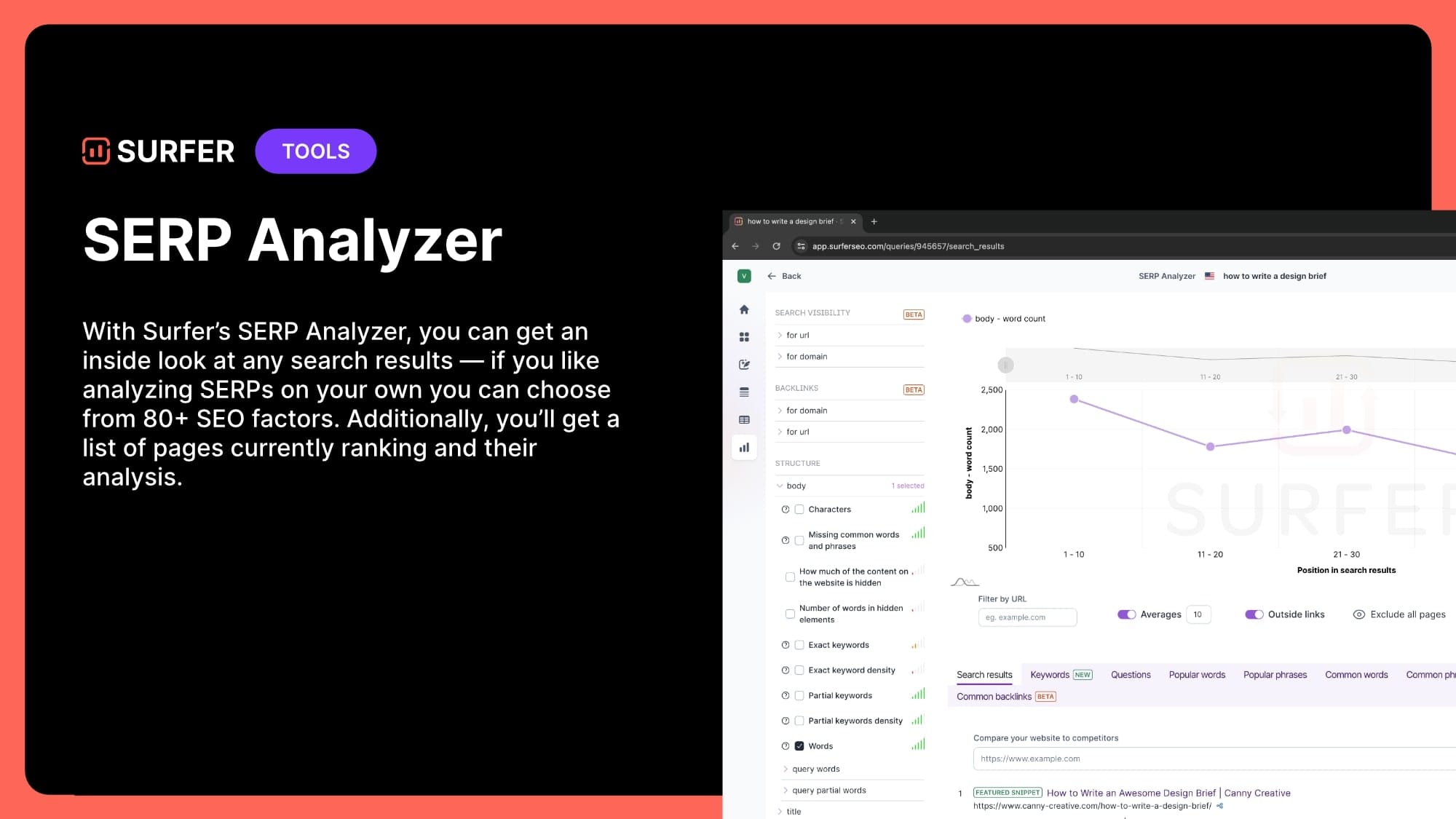
All these features come together to give you a comprehensive SEO tool that can streamline your optimization efforts.
SurferSEO has no free plan, but new accounts get a 7-day free trial of the Pro plan. Paid plans run from $49 a month (Discovery) to $299 a month (Peace of Mind), billed yearly. Standard is $99 and Pro is $182. I go through what each plan includes in my full SurferSEO review.
2. Ahrefs
Off-site SEO is something that often gets overlooked. It’s an essential part of search engine optimization, but managing backlinks, tracking mentions, and maintaining link health can feel overwhelming.
Ahrefs is the tool I turn to when I need to simplify the process. It’s packed with features that make link-building and off-site SEO easier to manage. It also has a broken links tool, which finds and fixes broken links before they impact rankings. It's a real time-saver for busy marketers handling multiple tasks.
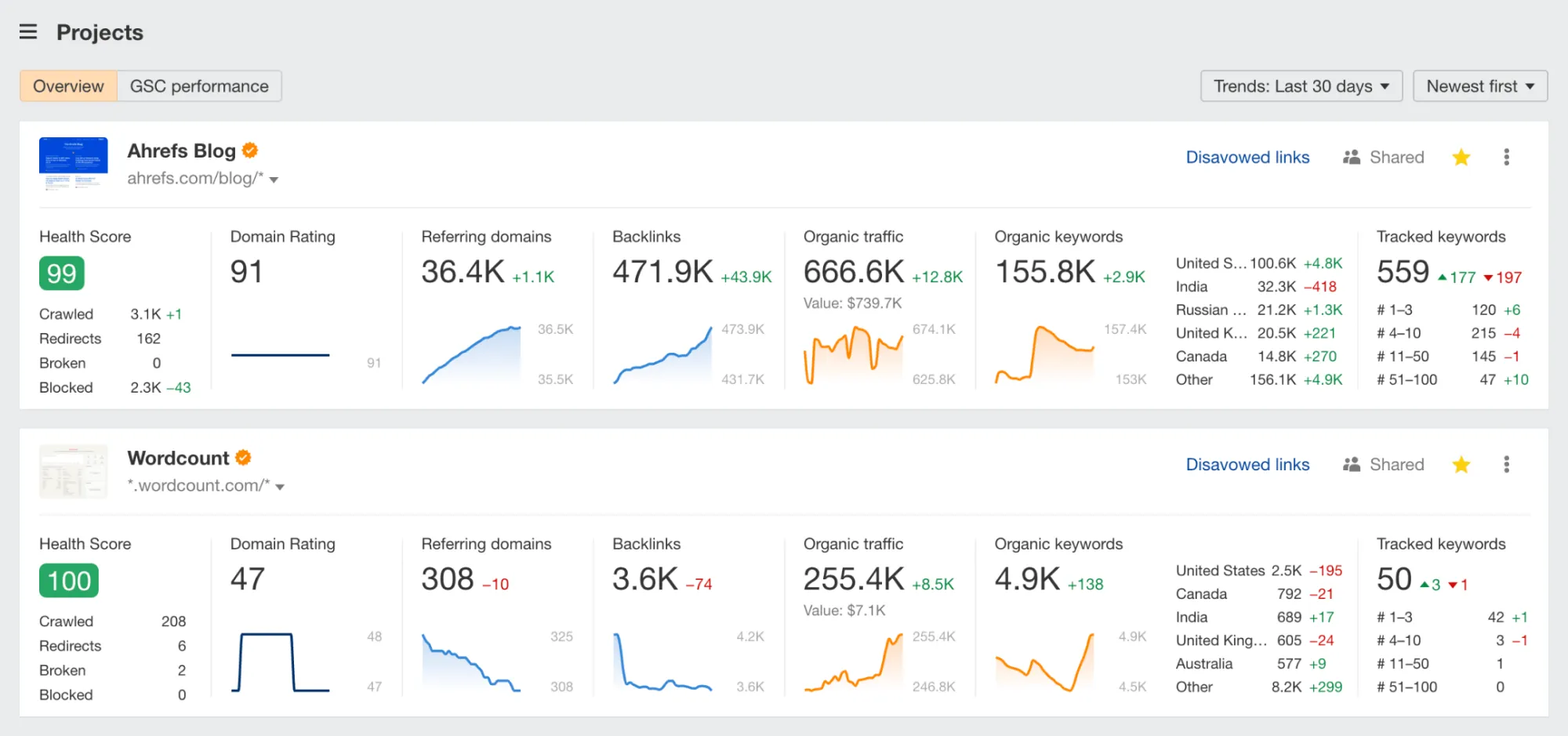
Here’s a quick look at some key Ahrefs features:
- Backlink analysis: Easily identify link opportunities by reviewing competitor backlinks.
- Broken link checker: Quickly spot and fix broken links across your site.
- Keyword research: Explore valuable search terms on multiple search engines.
- Site audit: Pinpoint technical issues that may affect your search rankings.
With these tools, off-site SEO becomes much more approachable and effective.
Ahrefs does not run discounts, and its free option is Ahrefs Free rather than a trial. Starter costs $29 a month with limited data, and Lite costs $129 a month (paying yearly saves up to 17 percent). Ahrefs Free gives you limited Site Explorer and Site Audit data for your own site.
3. SE Ranking
I use SE Ranking to track website performance and conduct research. From monitoring keyword positions to overseeing backlinks and running detailed site audits, the platform makes managing SEO easy. It's also excellent for keyword and competitor analysis, which form the foundation of any website's SEO.
SE Ranking's intuitive interface, combined with automation features and easy-to-read reports, saves time and boosts efficiency.
Here's a quick look at what SE Ranking offers:
- Rank Tracking: Monitor your keyword positions across locations, devices, and search engines.
- Website Audit: Detect and fix technical issues that may hurt your rankings.
- Competitor Research: Analyze what's working for your rivals and find new growth opportunities.
- Keyword Research: Analyze any term using all essential metrics and discover keyword suggestions.
- Backlink Checker & Monitoring: Analyze any backlink profile and keep an eye on your new and lost backlinks.
With SE Ranking, SEO performance tracking becomes simple, accessible, and actionable - making it an ideal choice for small businesses looking to improve their online visibility.
4. Google Search Console
Google Search Console is a free tool I lean on for monitoring how my website performs on search engines. It gives me insights on things like which keywords are driving traffic and how my pages rank over time.
One of the best parts is that it’s pretty easy to get started. Just add your website, submit a sitemap, and you’re off. From there, Google Search Console shows you which pages are indexed and which need more love.
Here are some of the key features I rely on:
- Performance monitoring: Track which keywords and pages are performing well in search results.
- Indexing: Make sure Google is picking up your most important pages.
- Page experience: See Core Web Vitals results for your pages on mobile and desktop.
- Backlink insights: See which sites are linking back to your site.
It’s especially helpful when paired with Google Analytics and Google Keyword Planner. These tools combined give you a clear view of both how visitors interact with your site and how search engines see it.
If you're looking to improve your site’s SEO, I highly recommend using Google Search Console to stay on top of your search performance and optimize your strategy.
5. AnswerThePublic
I always used to think that free SEO tools were a distant dream, until I found Answer The Public.
Although it’s not your typical SEO tool, it offers powerful features that can help with keyword research and content creation.
Say you want to come up with new blog topics or SEO keywords. With Answer The Public, you just enter a seed keyword (e.g. "marketing", and it generates tons of real-time questions people are asking online.
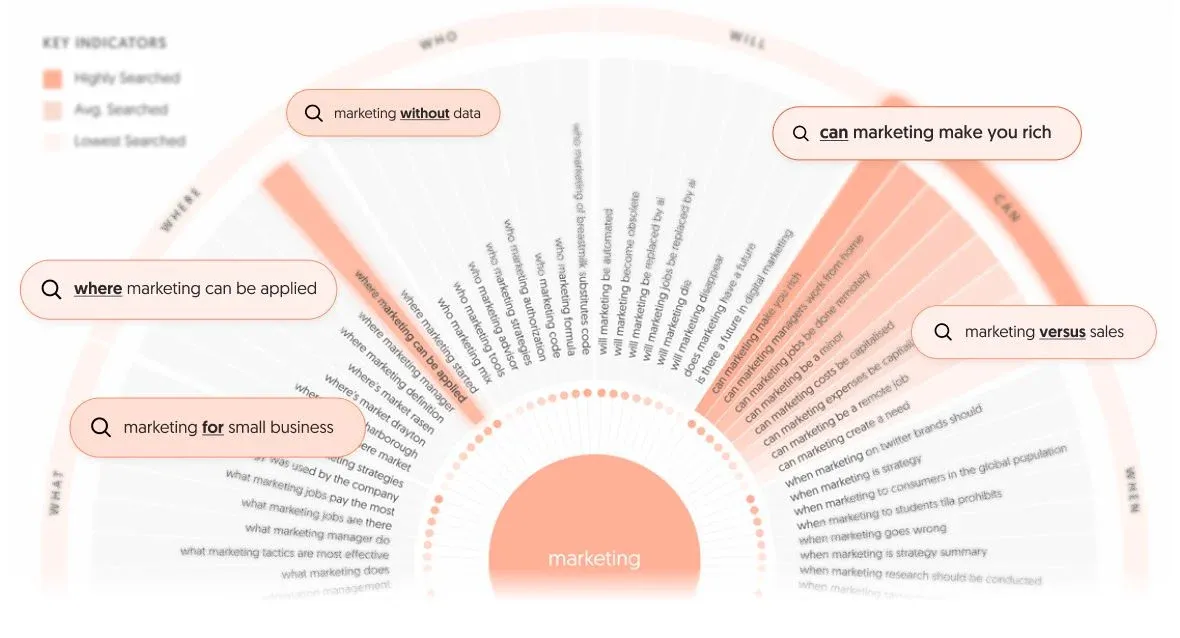
Even better, it organizes these questions into categories like “what,” “how,” and “why,” giving you structured ideas for content.
Here are some of its key features I’ve found useful:
- Audience questions: Quickly discover what potential customers are curious about.
- Keyword opportunities: Find untapped long-tail keywords to target in your SEO strategy.
- Competitive insights: See how people compare your products or services with competitors.
- Content clusters: Build out related topics to form a strong, interconnected content strategy.
For any small business looking to extract valuable insights and boost their SEO, Answer The Public is a great tool to have in your arsenal.
The free version limits how many searches you can run per day. Paid plans start at $10 a month billed yearly, for 100 searches a month. For more options, see my guide to the best keyword research tools.
6. Yoast SEO
If you use WordPress, Yoast SEO is a must-have for improving your site’s visibility.
I included it in my list because it’s the tool I rely on to optimize meta descriptions and make sure my content appears the way I want in search results.
Yoast also makes local SEO easy. You can add your location details to help your business rank better in local searches, which I’m sure many small business owners will appreciate.
Moreover, Yoast automates technical SEO tasks like generating sitemaps so you have more time to work on your business.
Here are some other handy features of Yoast:
- SEO analysis: Offers suggestions to improve the content and keyword placement.
- Readability checks: Ensures your content is easy to read for your audience.
- Social sharing previews: Lets you customize how your content appears when shared on social media.
- Rich snippets: Supports structured data for better visibility in search results.
- Redirect manager (in premium): Easily manage 301 redirects to fix broken links.
Each of these features makes Yoast an essential tool for anyone serious about optimizing their WordPress site.
The free plugin covers the basics. Yoast SEO Premium costs $118.80 a year (excluding VAT) for one site.
7. Agility Writer
The last tool on my list focuses on a key part of SEO: content creation.
Agility Writer is what I turn to for generating SEO-optimized content quickly. I use it for blog posts, product descriptions, and web pages, and it builds in relevant keywords to help my content rank well in search results. This saves time and effort while ensuring everything is optimized for search engines.
What makes it especially useful for me is how it handles multiple pieces at once. This works especially well for e-commerce SEO (I know because we're using it for our own e-commerce brand). For large content projects, it delivers structured articles that maintain consistency without feeling repetitive.
Here are a few other features I find helpful:
- Outline builder: Generates outlines based on top-ranking content to keep your writing structured and relevant.
- One-click writing: Produces full articles ready for publishing in just one click.
- SEO keyword integration: Automatically adds relevant keywords to improve visibility in search engines.
Plans start at $28 a month (Basic). A $1 trial gives you enough credits for one or two long articles, so you can judge the output before paying.
If you’re curious, check out my full Agility Writer review for more insight. For more writing tools, see my guide to the best AI writing tools.
How To Choose SEO Software For Your Small Business
Start with the one job you need done, then look at what it costs over a full year. This is how I would pick:
- On a budget: Start with Google Search Console and the free Yoast SEO plugin. Add AnswerThePublic's free searches for topic ideas. That setup costs nothing.
- Writing a lot of blog content: SurferSEO. Discovery at $49 a month is enough to start.
- Building links and watching competitors: Ahrefs. Starter at $29 a month is a cheap way in, and Lite at $129 gives you more room.
- Running WordPress: Yoast SEO first, because it handles sitemaps and meta descriptions for you.
- Publishing at volume: Agility Writer, as long as someone edits the drafts.
I would run the free tools for a month before paying for anything. Once you know what you are missing, buy one paid tool that fixes that gap and add a second only if you outgrow it.
Two tools I have not tested myself come up often. Semrush starts at $117.33 a month billed yearly ($139 monthly) with a 7-day free trial. Ubersuggest plans run from $29 to $99 a month, and monthly plans include a 7-day free trial.
If you want a content optimisation tool in a higher price range, read my Clearscope review. NeuronWriter is a cheaper alternative to SurferSEO.
If you run a Shopify store, I also cover SEO tools for Shopify stores in a separate guide.
SEO Tools For Small Business: FAQ
Is there a free SEO tool for small businesses?
Yes. Google Search Console is free and shows which searches bring visitors to your site and which pages Google has indexed. The Yoast SEO plugin has a free version for WordPress. Ahrefs Free shows limited data about your own site, and AnswerThePublic gives you a few free searches a day.
What is the cheapest paid SEO tool on this list?
Yoast SEO Premium works out to about $9.90 a month, and AnswerThePublic starts at $10 a month billed yearly. Agility Writer ($28), Ahrefs Starter ($29) and SurferSEO Discovery ($49) come next.
Which SEO tool should a beginner start with?
Google Search Console. It costs nothing and shows you real data from Google about your own site. After that, add one paid tool for your biggest gap: SurferSEO for content or Ahrefs for links and competitors.
Does a small business need more than one SEO tool?
Usually two or three. Search Console covers the free data, and one paid tool covers the job you spend the most time on. Most small businesses do not need an enterprise suite.
Time to improve your SEO
Now that you’ve got the rundown on my top SEO tools, it’s time to see what works for you.
Start with the ones that seem most helpful for your business and give them a try. Test out a tool or two, focus on what you need most, and watch your site improve.
Your SEO journey doesn’t have to be complicated - just take it step by step, and the results will follow.