

I may earn a small commission if you buy through my links, at no extra cost to you. Disclosure
Prices checked on 29 October 2026 on Surfer's pricing page.
Surfer SEO changed its plans and prices a lot since this page was first written. The old START, ADVANCED and MAX plans are gone, and surferseo.com now redirects to surfer.ai, where the product is marketed as Surfer. This page lists what each current plan costs and who it fits. For my full opinion on the tool, read my Surfer SEO review.
What is Surfer SEO?
Surfer SEO is a data-driven SEO tool for optimizing website content. It gives real-time guidance while you write, audits existing pages, and compares your page with the ones that rank. It also covers AI search visibility now. It is my favorite SEO tool.
Background of Surfer SEO
Surfer SEO was started by Michal Suski and Tomasz Niezgoda and has become one of the best-known content optimization tools. It works from the pages that already rank for your keyword, so you see what they cover and what your draft is missing.
Surfer SEO Pricing Plans (October 2026)
Surfer has four self-serve plans plus Enterprise with custom pricing. Every Surfer SEO plan includes Content Audit, SERP Analyzer and Topical Map. The plans differ in how many documents you can create, how many AI prompts Surfer tracks, and how many seats you get. You can start with the 7-day Pro trial (details below) before you pick a Surfer SEO plan.
The prices below are per month. Paying yearly is about 17 percent cheaper than paying month to month. Tracked pages range from 10 on Discovery to 500 on Peace of Mind.
| Plan | Yearly billing | Monthly billing | Documents/year | AI prompts tracked | Seats |
|---|---|---|---|---|---|
| Discovery | $49 | $59 | 120 | None | 1 |
| Standard | $99 | $119 | 360 | 25 in ChatGPT, weekly | 3 |
| Pro | $182 | $219 | 360 | 50 across all models, daily | 5 |
| Peace of Mind | $299 | $359 | Unlimited (fair use) | 100, daily | 10 |
| Enterprise | Custom | Custom | Custom | Custom | Custom |
Discovery plan
- Price: $49 per month billed yearly, $59 month to month
- Documents: 120 per year
- Seats: 1
- AI prompt tracking: none
- Integrations: no Google Docs or WordPress integration
Who is the Discovery plan best for?
One person writing a modest number of articles who is fine working inside Surfer's own editor. If you write in Google Docs or publish through WordPress, you will want Standard or higher.
Standard plan
- Price: $99 per month billed yearly, $119 month to month
- Documents: 360 per year
- Seats: 3
- AI prompt tracking: 25 ChatGPT prompts tracked weekly
Who is the Standard plan best for?
Small teams and serious bloggers who publish regularly and want the Google Docs and WordPress workflow. This is the entry point for most writing teams.
Pro plan
- Price: $182 per month billed yearly, $219 month to month
- Documents: 360 per year
- Seats: 5
- AI prompt tracking: 50 prompts across all AI models, tracked daily
- Extras: MCP server
Who is the Pro plan best for?
Teams that care about AI search visibility as well as Google rankings, and want daily tracking across all AI models. The MCP server lets you pull Surfer data into tools like Claude.
Peace of Mind plan
- Price: $299 per month billed yearly, $359 month to month
- Documents: unlimited (fair use)
- Seats: 10
- AI prompt tracking: 100 prompts, tracked daily
Who is the Peace of Mind plan best for?
Agencies, publishers and content teams that produce a lot of articles and do not want to count documents.
Enterprise plan
- Price: custom
- Documents, seats and AI prompts: custom
Who is the Enterprise plan best for?
Large organizations with high volume or specific requirements. You need to contact Surfer for a quote.
AI Search Analytics plan
- Price: $82 per month billed yearly
- AI prompt tracking: 50 prompts, tracked daily
- Seats: 5
This plan only tracks AI visibility. It does not replace the content plans above, so it fits teams that already have a content workflow and want to see how their brand shows up in AI answers.
Yearly vs monthly billing
Yearly billing is the cheaper way to buy. Discovery costs $49 a month yearly and $59 month to month, and the same pattern holds on every plan. If you are not sure you will keep Surfer for a year, start with the trial first and decide after.
Is there a free trial or free plan for Surfer SEO?
There is no free plan, but there is a trial. New accounts get a 7-day free trial of Pro through Surfer SEO. A card is required, and the trial turns into a paid plan unless you cancel before it ends.
The free Keyword Surfer Chrome extension is the closest thing to a free version. I could not find a refund policy on the current pricing page, so ask support before you rely on one.
My Personal Experience with Surfer SEO
I found Surfer SEO while searching for simple yet effective SEO tools. It fits well with my approach of using data and practical methods, as I explain in my SEO Framework article. The tool's instant editing tips have been a big help, letting my team make changes quickly, almost like having an SEO expert with us.
Surfer SEO's in-depth site checks match my style of detailed analysis and ongoing improvements. It's great for both beginners and experts. Even our interns, who are new to SEO, have been doing really well with it.
At PL & Partners we use a mid-tier plan, because we need regular Content Editor and Audit use across client sites. The cost makes sense when one improved article can bring in leads or revenue. It makes less sense if you publish one casual post a month.
Features and Benefits of Surfer SEO
Surfer SEO focuses on the content side of SEO, which is where most sites have the biggest gaps.
Note: If you want to skip the reading and rather watch a video about Surfer, I can recommend this 3 minute one. It really explains Surfer SEO very well.
These are the features I use most:
Content Editor
The Content Editor gives you real-time suggestions for keywords, headings and structure while you write.

How it works:
- Keyword Input: Enter your target keyword to set the stage for your content.
- Guideline Generation: Surfer SEO analyzes top pages for your keyword, creating tailored guidelines for word count, keyword density, and more.
- Real-Time Writing Assistance: Get instant feedback while writing, with suggestions on keyword inclusion and content length.
- Additional Insights: Receive relevant questions and image usage tips.
- Content Optimization: Refine your content to achieve a high optimization score, then export for publishing.
The Content Editor makes SEO writing more structured. Writers see what is missing before the draft reaches an editor.
Content Audits
Already have content out there? Content Audit compares your existing pages with the top-ranking ones and tells you what to change. It connects to Google Search Console.
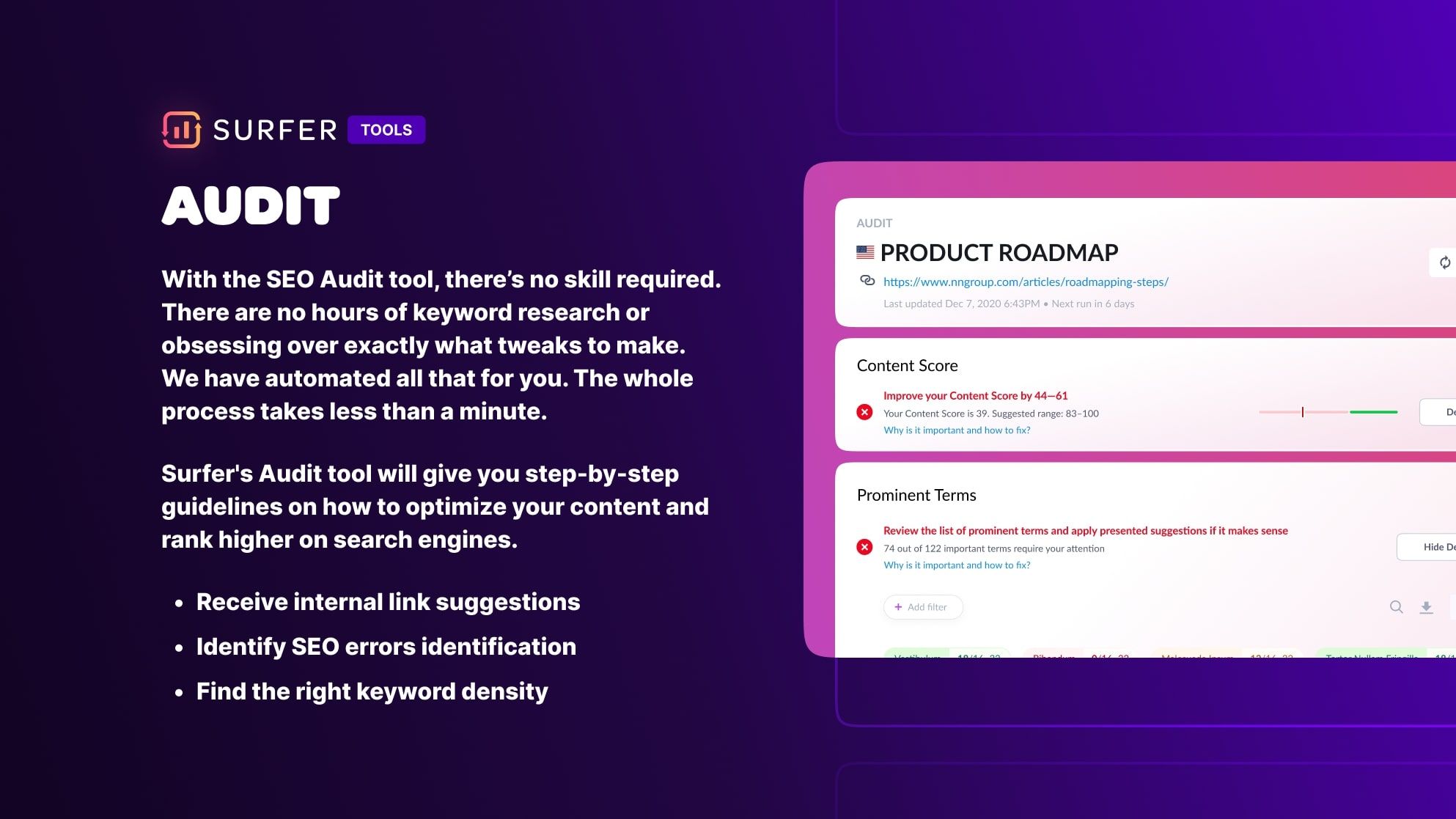
How it works:
- Page Selection: Pick a page you want to improve.
- Competitor Analysis: Surfer SEO compares your page with top-ranking competitors.
- Audit Report: Receive a report pinpointing your page's strengths and weaknesses.
- Actionable Recommendations: Get specific steps for optimization, like keyword adjustments and content structure improvements.
- Implementation and Tracking: Apply changes and monitor the impact on your page's performance
SERP Analyzer
The SERP Analyzer shows what the top results for a keyword have in common, such as word count, headings and content format. I use it for competitive keywords where small decisions matter.
On-page SEO Optimization
Surfer focuses on on-page SEO: headings, terms, word count and structure.
Keyword Research and Topic Clustering
Surfer's keyword research groups related keywords by SERP similarity, which helps when you plan content hubs. I still check volume and difficulty in a dedicated keyword tool.
Google Docs and WordPress
You can draft in Google Docs or WordPress and watch the optimization panel while you write. These integrations are not included on Discovery.
None of this replaces keyword strategy or link building, but it takes the guesswork out of on-page work.
Comparing Surfer SEO with popular SEO Tools
When it comes to SEO tools, the market is brimming with options. Let's see how Surfer SEO stacks up against some of the other popular tools:
Surfer SEO vs. Ahrefs
- Ahrefs is renowned for its backlink analysis and keyword research capabilities. It's a comprehensive tool that offers a wide range of features for SEO professionals.
- Surfer SEO focuses more on on-page optimization, content planning, and audits. It's particularly strong in providing real-time content optimization suggestions.
- Best For: Ahrefs is great for in-depth backlink analysis and broader SEO strategies, while Surfer SEO is ideal for content creators and those focusing on on-page SEO.
Surfer SEO vs. SEMrush
- SEMrush offers a broad suite of tools covering everything from SEO to social media and PPC. It's known for its keyword research and competitive analysis features.
- Surfer SEO differentiates itself with its AI-driven content editor and detailed content audits, making it a go-to for content optimization.
- Best For: SEMrush suits those looking for an all-in-one marketing toolkit, whereas Surfer SEO is more specialized for content optimization and on-page SEO.
Surfer SEO vs. Moz Pro
- Moz Pro offers a range of SEO tools, including keyword research, site audits, and rank tracking. It's well-regarded for its user-friendly interface and community resources.
- Surfer SEO stands out with its real-time content optimization and detailed competitor analysis, offering more specialized content-focused tools.
- Best For: Moz Pro is a good all-around SEO tool for beginners and intermediates, while Surfer SEO caters more to those prioritizing content optimization and detailed on-page analysis.
In short, Ahrefs, SEMrush and Moz Pro cover more of SEO. Surfer covers content and on-page work in more detail.
Is Surfer SEO worth the investment?
If you ask me: yes, if you publish content regularly. It is fair value for serious use and a poor deal if you publish one post a month.
For content optimization and on-page SEO, Surfer SEO is a good investment. We took anew sleep from 0 to 10,000 monthly visitors in about a year, and Surfer is part of that stack. Read more about it:

Conclusion and Final Thoughts
Surfer SEO is built for content optimization. The Content Editor and Content Audit are the parts I would pay for.
The four plans run from Discovery at $49 a month billed yearly to Peace of Mind at $299, with Enterprise on top. Pick based on documents, seats and how many AI prompts you want tracked.
The 7-day Pro trial is a low-risk way to test it, as long as you cancel before it ends if you do not want to pay. A card is required.
In short, Surfer SEO is worth it if content drives your traffic. For pros, cons and alternatives, read my Surfer SEO review.